
Integrating Zapier
-
AgentRoof Provides WebHook to connect your Zaps
-
Using AgentRoof WebHook you can send data of leads from any application connected to Zapier to AgentRoof CRM
-
The WebHook Accept the following information
-
Name
-
Email
-
Phone
-
Campaign Name
-
Adset Name
-
Find below the instructions to connect your Zaps to AgentRoof CRM
-
Create new Zap trigger Refer: Set up your Zap trigger
-
Or you can use your existing Zap trigger
-
-
Create Action
-
Choose Action type as Webhook By Zapier
-
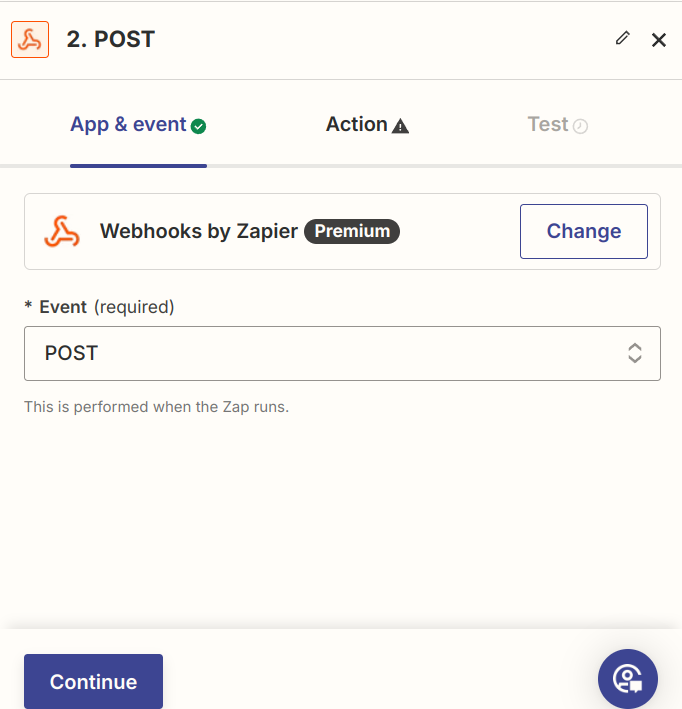
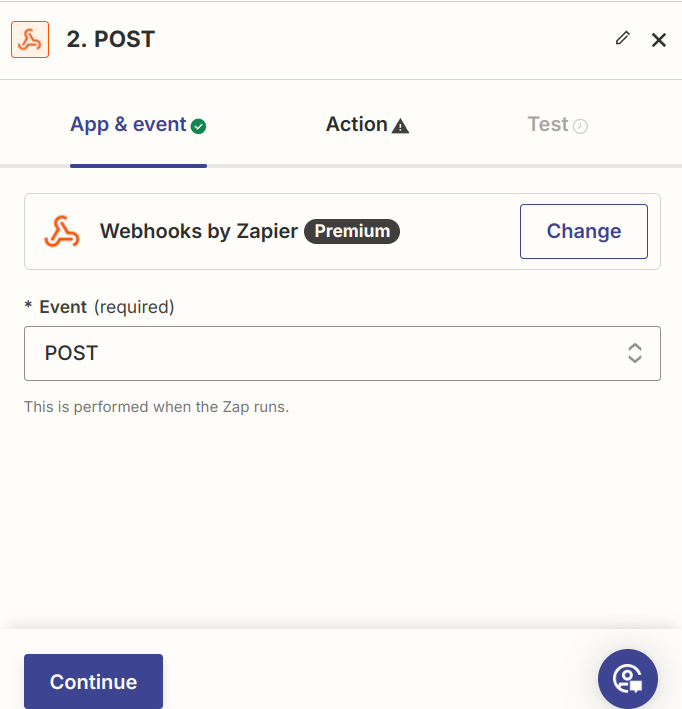
On the App & Event section
-
Choose Event as POST
-
Click Continue
-
-
In the action section enter the following details
-
URL
-
https://crm.agentroof.com/api/facebook-lead-via-zapier
-
-
Payload type
-
Form
-
-
Data
-
In this section add the following data using the '+' button
-
name
-
Choose name filed from your trigger
-
This is a required field
-
-
email
-
Choose email field from your trigger
-
Either email or phone is required
-
-
phone
-
Choose phone field from your trigger
-
Either email or phone is required
-
-
campaign
-
You can input any value or choose from your trigger
-
This is used to identify the source of the lead in CRM
-
This field is required
-
-
adname
-
This field is optional
-
It Can be used when you are running facebook add
-
-
-
Wrap Request In Array
-
Choose ‘No’
-
-
Unflatten
-
Choose ‘Yes’
-
-
Headers
-
Set header name as ‘APPKEY’
-
Value as
-
Your CRM KEY
-
Get the key from our support team
-
-
-
-
Click Continue
-
-
Test your step and verify you have received a lead in CRM
-
Publish the Zap
-
No comments to display
No comments to display